
I want to try MaxDent
Start a 15-day free trial and use MaxDent with real clinic work.
Start trial →Whether you are starting MaxDent for the first time, already purchased and want to activate your device, or are reinstalling on your current device, there is a clear and secure path for each case.
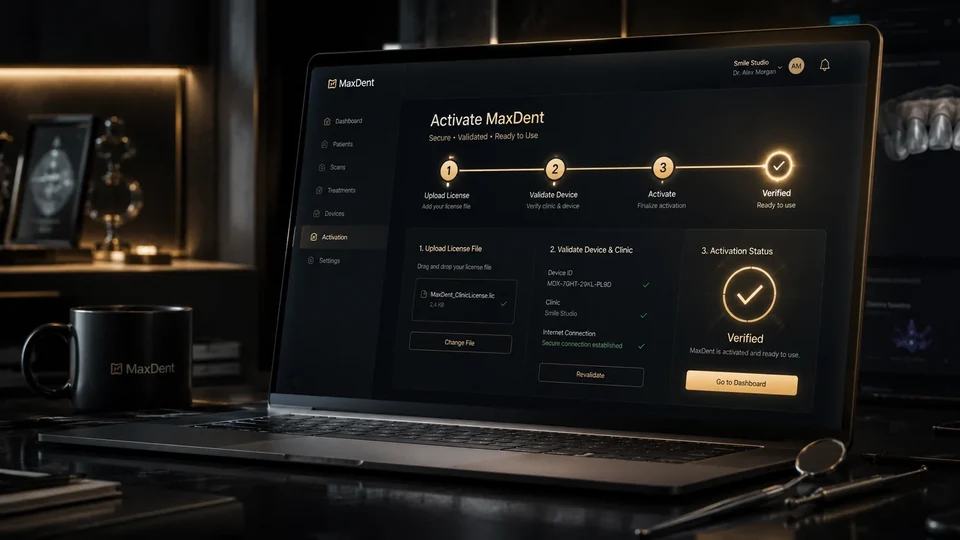
You do not need to read steps that do not apply to you. Start directly from your current situation.
Start a 15-day free trial and use MaxDent with real clinic work.
Start trial →Choose the edition and plan, then complete online purchase and activation.
View plans →Follow the activation steps after purchase using your purchase email and OTP.
Previous purchase steps →Contact support using the activation code or request file generated by MaxDent.
Manual activation →Test MaxDent for 15 days with real clinic work before making a purchase decision.
Choose a plan, complete payment, then bind the license to your device.
Use the purchase email and OTP to retrieve an eligible previous purchase.
Purchase and activation are connected but separate steps: successful payment confirms the purchase, while MaxDent becomes activated after the license is bound to the device.
Select the MaxDent setup that fits your clinic and scale.
Enter your information and complete payment through the secure purchase path.
If you purchased before installing, the order remains saved while waiting for the device.
Choose “Activate Previous Purchase” and enter the purchase email and OTP.
After verification, the license is bound to the device and activation completes.
Here are the activation steps after purchasing the software. You do not need to repeat the purchase flow.
If the license was previously activated on the same device, MaxDent can securely retrieve the license instead of issuing a new one.
After activation succeeds, we recommend downloading the activation file and keeping it in a safe place as a backup.
The file is not the only recovery method. You can still use “Activate Previous Purchase” or securely retrieve the license online when the device state allows it.
Moving a license to a different device follows the approved device-transfer path to protect the license.
If you have an eligible MaxDent license, you can use that same license on the same device to move from Pro to Enterprise or back again without buying a new license or paying an upgrade fee. Install the edition you need, then use the normal activation or Previous Purchase flow. Moving the license to a different device remains subject to the existing device-transfer controls.
When manual activation is needed, contact MaxDent Support using the activation code or activation-request file generated by MaxDent.
Online purchase and activation do not remove the manual activation path. It remains available when support is needed.
Eligible plans include MaxDent Mobile according to the plan term. Lifetime includes one year of Mobile; afterward Mobile requires separate renewal if you want to keep using it, while the core MaxDent license remains permanent.
Learn about MaxDent Mobile →Sign in with your email and OTP to access information and services linked to your purchases.
Open customer account →